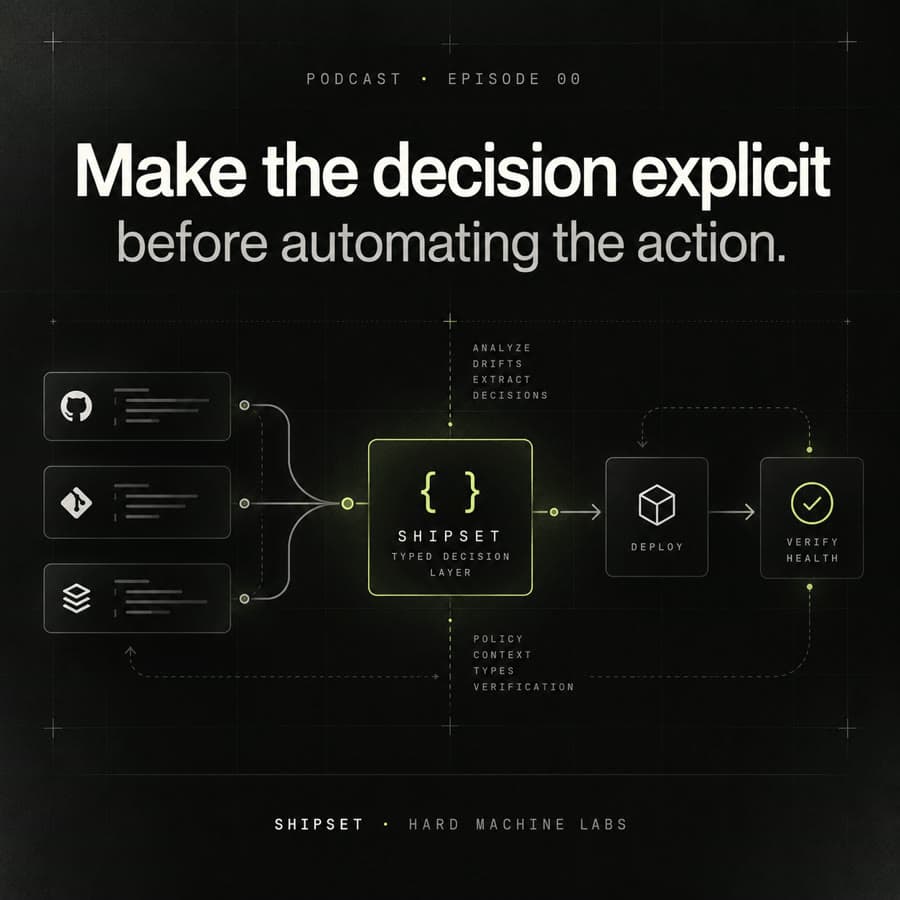
Podcast · Episode 00 · 5:35
Make the decision explicit before automating the action.
Why a copied pipeline drifts, what it costs, and the story of extracting Shipset from a production system — from shell scripts to a typed decision layer.
Deterministic delivery for TypeScript projects.
An open-source CLI and TypeScript library, extracted from a delivery pipeline that ran in production. It does not replace GitHub Actions, GitLab CI or Dokploy. It adds a small decision layer between a repository change and the deployment call.
A new project reaches the CI/CD step. You rarely start from zero. You open a previous project and reuse what already works.
It works. That is exactly why the habit sticks. The trouble does not show up on day one.
New services appear. Packages move. A shared contracts package shows up. The copied pipeline still carries a partial model of the older system.
Hand-maintained service inventories drift from the repository.
CI rebuilds more than the change requires.
Architecture rules live in documentation, where nothing enforces them.
Deployment configuration becomes inconsistent across targets.
A successful deployment trigger is taken as proof of a healthy service.
Secret handling is too easy to get wrong.
So the question changes
How do I deploy this project?
How does the pipeline know what needs to be deployed, whether the change respects the architecture, and whether the result is healthy?
Your CI still runs the jobs. Dokploy still deploys the containers. Shipset sits between them and makes the decision explicit. It answers six questions, in order, before and after the deployment call.
discoverWorkspacegit diffshipset detectshipset lint-archshipset planshipset deployUnder the hood: four pure functions (discoverWorkspace, detectImpactedServices, lintArchitecture, planDelivery) and one Dokploy adapter. One validated config file, shipset.config.yml. No daemon, no dashboard, no state store.
The original was a set of shell scripts for a pnpm + Turborepo monorepo, deployed to several VPS through Dokploy. It had the right operational ideas. Too many of them lived in hand-maintained files.
The extraction kept the ideas and replaced the assumptions with a smaller, typed system.
service-paths.shdiscoverWorkspaceci-detect.shdetectImpactedServiceslint-zero-trust.mjslintArchitectureci-deploy.shplanDelivery + Dokploy adapterdeploy.targets.jsondelivery.targets + tokenEnvThe goal was never a new CI platform. It was a decision path that is explicit and testable.
Acme is a fictional insurance platform: a pnpm + Turborepo monorepo with a shared contracts package, two product services and a web portal. Same repository as before. This time, the workflow starts from the repository itself.
shipset initinit writes shipset.config.yml and copies the CI templates and a Dockerfile into the repository. They are plain files you own and can edit.
The config is validated on every command (schema shipset/v1). A mistake stops the run with a line that says how to fix it.
$ pnpm dlx shipset init✓ shipset.config.yml✓ .pipeline/ci/gitlab/✓ .pipeline/Dockerfileproject: name: acme structure: monoreposhipset.config.ymlYou describe the boundaries, not a copy of the service list. Here: web may import product and shared; product may import shared.
A reverse dependency such as product → web can be rejected. Business code should not start depending on the web interface.
layers: - name: shared path: packages/shared shared: true allow: [] - name: product path: packages/product allow: [shared] - name: web path: packages/web allow: [shared, product]product → web · rejected
discoverWorkspaceFor each package it reads the name, path, version, layer, framework and dependencies straight from the repository and its package.json files.
The service map follows the repository instead of being copied from a previous project. Packages in a shared layer are not deployed on their own.
| Service | Layer | Deployable |
|---|---|---|
| billing | product | yes |
| claims | product | yes |
| portal | web | yes |
| contracts | shared | no |
shipset detectdetect maps each changed path to the discovered workspace. One file changed in Billing, so Billing is the only service to build and ship.
The decision comes from git changes and repository structure, not from semantic similarity. The same input always gives the same answer.
M packages/product/billing/src/invoice.service.tsshipset lint-archTypeScript can compile and tests can pass while the architecture quietly degrades. lint-arch checks every internal dependency between packages against the declared layers.
A violation stops the merge request, with a hint on how to fix it.
$ shipset lint-arch✗ product → web hint: use an API, an event or a shared contractexit 1shipset plan vps-prodThe plan says what will be deployed, where it goes and how its health will be checked. The image tag comes from the version in package.json.
Planning is pure: nothing is called and nothing is built. You can read the decision before anything happens.
$ shipset plan vps-prodservice: billingimage: registry/acme/billing:1.4.2target: vps-prodhealth: /healthshipset deploy vps-prodShipset sends the image reference to each configured Dokploy webhook. One target is one VPS; a second VPS is a second target, on the same code path.
The token never appears in the config. tokenEnv names a CI variable. The value is read from CI only when the request is made, and never logged.
webhooks: - url: https://... tokenEnv: DOKPLOY_TOKENhealth checkA webhook that answers 200 only means the request was accepted. The container can still crash, or never become ready.
So Shipset checks the configured health endpoint, with a retry budget (20 attempts, 5 seconds apart by default). A failed webhook skips the health check, and the job exits with an error.
Outputs are simplified for reading. The CLI prints JSON for detect and plan.
Not every project is a monorepo. With a single-package repository there is only one deployable unit, so impact detection is simple. The validated config, the explicit plan, the secret handling and the health check stay just as useful.
$ pnpm dlx shipset init$ shipset detect→ claims-api$ shipset plan vps-prod→ registry/acme/claims-api:2.1.0$ shipset deploy vps-prod→ webhook 2xx→ health OKproject: name: claims-api structure: monolithic delivery: registry: registry.example.com/acme targets: - name: vps-prod adapter: dokploy webhooks: - url: https://... tokenEnv: DOKPLOY_TOKENShipset ships with a skill for coding agents: an operating manual the agent reads before it touches the repository. It covers adopting Shipset in a project and working on Shipset itself.
A developer can ask:
Add Shipset to this repository. Billing and Claims deploy to our Dokploy VPS.Do not commit secrets.The skill then walks the agent through an explicit procedure:
The point is not automation for its own sake. The human documentation and the agent skill describe the same system, so the agent has less to guess.
The current path
The first adapter is Dokploy because that is where the pipeline came from. The rule for anything else: one adapter at a time, validated in production before the next.
Derive instead of duplicate.
If the repository already contains a fact, derive it instead of maintaining another inventory.
Make boundaries executable.
Architecture documentation is useful. Architecture rules that can fail CI are harder to ignore.
Separate decision from action.
The plan should be inspectable before anything with side effects runs.
Prefer deterministic context.
Impact comes from repository structure and git changes, not from approximate semantic retrieval.
Fail early.
A configuration error should stop the workflow before deployment, not halfway through it.
Make blast radius visible.
What changed, what does it affect, and what exactly are we about to ship?
The idea
Calling a deployment webhook is the easy part. What matters is that the pipeline can answer, in order: what exists, what changed, what is impacted, what is allowed, what ships, and whether it became healthy.
Why a copied pipeline drifts, what it costs, and the story of extracting Shipset from a production system — from shell scripts to a typed decision layer.
A recorded run of the full workflow, from init to a verified health check.
Coming soon
Shipset · demonstration
Questions about Shipset, delivery pipelines, or a problem worth exploring together.
Discuss this tool